localthings as an alternative to Google My Maps
Google My Maps is free and fine for dropping a few pins. The moment you want a map that looks like part of your brand — your colours and logo, filters for visitors, embedded neatly on your own site — you run into its limits.
- Google My Maps is free and quick for a handful of points, but your map keeps looking like Google and visitors cannot filter it.
- localthings gives you the same speed, plus your own branding, category filters and a clean embed on your own site.
- You can move over with a CSV export from My Maps — nothing has to be retyped.
- Free to start; a custom domain and removing our branding are in the paid plans.
localthings vs. Google My Maps
A factual comparison on the points that matter to most people.
| Feature | localthings | Google My Maps |
|---|---|---|
| Free to start | ||
| No code required | ||
| Your own colours and logo | ||
| Category filters for visitors | ||
| Rich location cards with photos | Limited | |
| Clean embed on your own site | With Google's interface | |
| Your own domain (map.yourcompany.com) | On Premium | |
| White-label (no third-party branding) | On Premium | |
| Bulk import from CSV | ||
| Visitor analytics on your map | On Premium |
When Google My Maps is the right call
For a quick personal map you share with a handful of people, where branding is irrelevant, Google My Maps is free and takes minutes. All you need is a Google account.
When localthings fits better
When the map is public-facing: your own colours and logo, category filters visitors actually use, rich location cards with photos, and a clean embed or your own subdomain. That is what localthings is built for — no code, and no Google interface wrapped around your content.
The same kind of map, a different feel
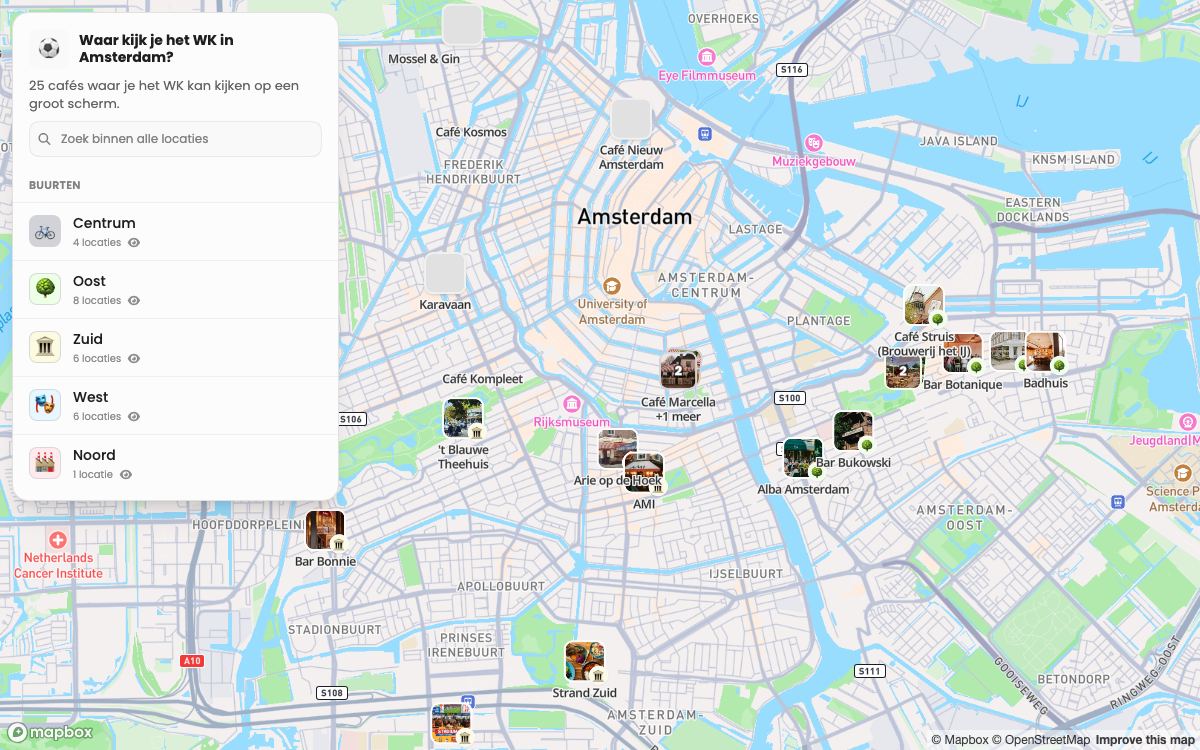
Next to this is a published localthings map of 25 Amsterdam cafés. The same idea as a My Maps list, but with a photo per place, filters and a look of its own.
- 25 cafés, each with its own photo and description.
- Grouped by district, which is what the visitor filters on.
- Works on a phone without an app or a Google account.
- One link, which you update without republishing.
Frequently asked questions
Can I move my Google My Maps map to localthings?
Yes. Export your locations from Google My Maps as CSV or KML with the addresses, then import that file. After the import you set up categories, colours and your own branding.
Is localthings free like Google My Maps?
Free to start with one map and up to 100 locations; paid plans are per map.
Can I put the map on my own website?
Yes, with an embed snippet, or you can share it as a link. On Premium the map is fully white-label and can live on your own subdomain.
How do I make a map with multiple locations in my own style?
Google My Maps lets you place multiple locations but not brand them or add visitor filters. In localthings you import the same locations from a spreadsheet and get categories, your own colours and a clean embed.